Adding jump links to an article

We have a very long article which is our terms and conditions. I have just rewritten these and to make it easier i created a list at the top of the article of all the headings so you could click and jump direct to the relevant section. Unfortunately when transferring this from Word to the platform the jump links no longer work. I can obviously add hyperlinks to flip to a different article but can't add links within the article to jump down the page. Is this possible? Sorry if i haven't explained that very well. This is the article and as you can see the links won't jump which they did in Word when i created the article before copying and pasting cancerchat.cancerresearchuk.org/.../terms-conditions

Parents
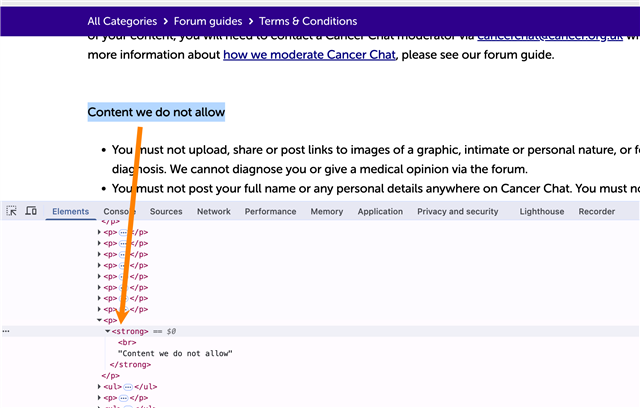
  •   I agree with  about inserting a Table of Contents (they are supported in Articles) into the body of your article. This should be an option in the Insert menu and pulls all of the headers automatically. However, looking at the "headers" in the article you linked, these are not real formatted headers, they're just bold text:

    You'll want to do one of two options:

    1) Change these headers (like "Content we do not allow") to Headers using Format > Formats > Headings, and set all to "Heading 2". Then, delete your existing "jump links" at the top of your article and insert the Table of Contents in their place. Publish your article and the TOC will populate automatically with all of the headers

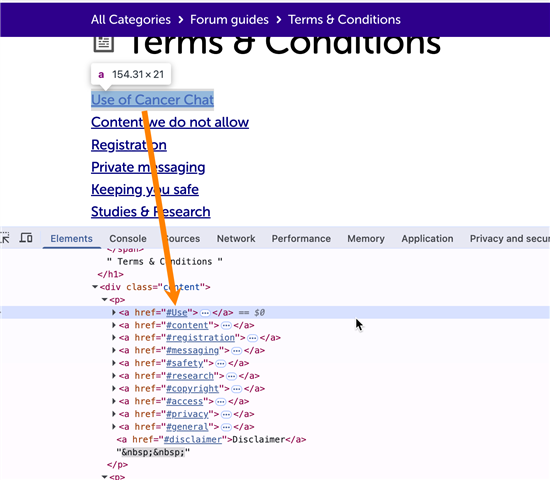
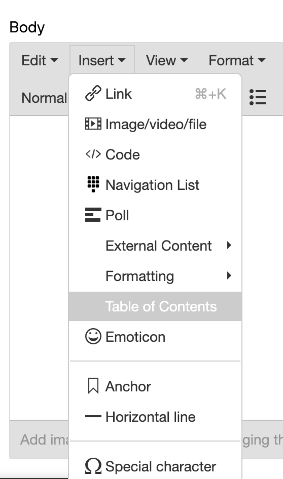
    2) Keep your article as-is, but put your cursor in front of the "header" and click Insert > Anchor. For each header, use the corresponding anchor as the anchor name on the insert menu (e.g. "#Use", "#content", etc.). After saving your article, this should make your existing "jump links" work properly, assuming you use the same/matching names.

    I also have an article on my site about how to do this in more detail which you can see here: https://sugarclub.sugarcrm.com/community-help/a/knowledge-base/KB79/inserting-a-table-of-contents-or-anchor-into-a-post 

  • sorry this is a really old thread but I am trying to do this and actually we don't have the anchor option in the editor? Is this something I can fix easily? 

Reply Children
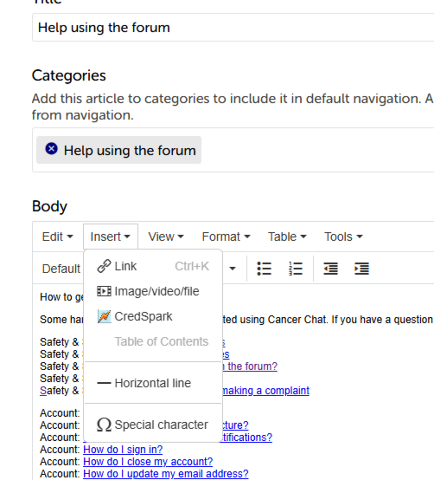
  •    – your "Insert" menu in Articles is much different than mine:

    My guess is to try going to Admin > Applications > Content > Articles and seeing what you've deactivated that may be relevant. Maybe "Mentions" or "URL Embedding"? I don't know what would control that.

    I'd also recommend testing another application type (blog, forum, etc.) to see if that option shows there so you can narrow the issue down to Articles or not. 

  • Hi  and  !

    I just wanted to share some testing I did on this one. Social Edge hosts a couple of demo sites that are pretty vanilla, with little to no customizations: one on version 13 and one on 12.1.4.

    On both sites I went through both of Alex’s checks. I made sure URL embedding (under Files and URL Embedding) was enabled in Filtering, both globally (Administration > Moderation > Filtering) and for Articles (Administration > Applications > Content > Articles > Filtering). I also checked other application types, like blogs and forums. I didn’t see the Anchor option in the Insert menu on either demo site, in any application.

    So I’m wondering if this comes down to version or customizations rather than a setting. Would you both mind sharing:

    1. Which version of Verint Community you’re on?
    2. Whether your site has any customizations to the editor or widgets?

    Alex, if you upgraded recently, it’s possible your site kept the Anchor option through the upgrade. Sarah, if your site has customizations, one of them may have overwritten it. Or, if Sarah’s site is on a later version than Alex’s, Verint may have removed the Anchor option from the editor in that release.

    In the meantime, the Table of Contents approach is still an option, with one thing to know: when you click an item in the TOC, the page scrolls slightly past the heading. That’s most likely because the site’s header bar sits on top of the content, so the heading ends up hidden underneath it. It can be fixed with a small customization to the TOC link behavior that offsets the jump by a set number of pixels, matching the header height, so the heading lands just below the bar. Happy to share more on that if it would help!

    Thank you both so much! I’m looking forward to figuring this one out together :)

  • Thanks for checking, . That difference is really strange. I'm on 12.1.4.25057 (upgraded from 11.1.###) and don't have any customizations to the editor to my knowledge. 

    Another option is to go into the post's HTML and manually add a <div> with an id={your_id} which replicates this functionality, just takes some extra steps. ( <div id="jump_link_1">{your section of text}</div> and then going to https://cancerchat.cancerresearchuk.org/a/forum-guide/c/forum-rules/FG44/terms-conditions#jump_link_1 should perform the same way)