Change certain words language translation

I am looking to update the english to french translation for certain words within the community. Is this possible from within the site itself or anywhere else?

Parents Reply Children
  • Former Member
    0 Former Member in reply to Nick Jobson

    Tokens are listed under Administration > Translations > Tokens.  You would only be able to change the text on tokens that rely on a resource listed in its Translations tab.  Some tokens set there value based on values from the content they relate to.  For instance the tokens that end in Content:Name are setting there value based on the Title of the content they refer to.

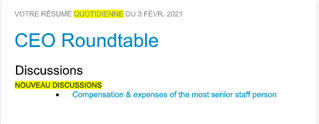
  • Thank you Mathew, I had a look through those areas. The token I believe is responsible is called "Email Digest: Application List: New Content: Count", and inside of a particular email digest it is rendering text that says "Nouveau Discussions" (New Discussions), and I am trying to change the Nouveau to Nouvelles. I have looked through tokens and translations for the email digests but can't find anything that would change it. I have attached some screenshots to help better see what I am referring too if that helps.


  • Former Member
    0 Former Member in reply to Nick Jobson

    The template is actually just using the count >0 as a check for whether to include that section of the digest. The "Discussions" text is coming from the Application Token "ApplicationPostTypeName" which doesn't get translated. I'm logging a bug for this, as those values should be translatable.

    [embed:1a3cced3-af51-49ce-89e2-91f65855cd2d:21449a01-7ca9-4646-93f0-35d422af2c3b:id=TE-16504]

  • Former Member
    +1 Former Member in reply to Former Member

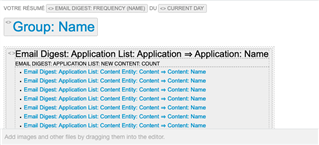
    I misread your reply a bit... you can translate the "New" part of the phrase from the Email Digest Body Template. You'll need to drill down to the right location in the digest...

    • Be sure you're editing Email Digest, Body template
    • Double click on the first large section that includes the "new content count" token
    • Double click the "Email Digest: Application List: New Content: Count" token
    • Change the Template drop down to "Vary condition is false"
    • You should see the place to change Nouveau to Nouvelle
    • Click "OK" all the way back out and click "Save" on the plugin.
  • Thanks so much for your help, Steven & Mathew! Really appreciate it.