Error message when viewing calendar event

Good day forum,

We're setting up a new calendar, and this will be our first time using it to this extent. After adding events, on the event page I'm seeing the following error: 
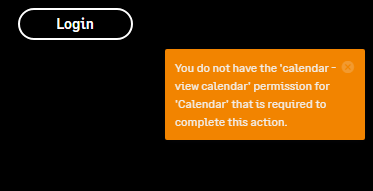
I have checked permissions on all possible levels, both the Group and Calendar levels.  I'm seeing this for both anonymous and registered users.

The group where the calendar lives is joinless, and the event also doesn't require registration (we're using Teams for registration - this is more for the visual). 

I cannot for the life of me find where this error is coming from. I've also checked all the widgets on the page - they were both reverted to default and the only custom edits are the resources (we have multiple languages). 

I'm using version 13.0.2.33658  (there is a bug blocking us from upgrading)

We did find this bug in the Release notes: 

  • TE-19274 - Fixed issue with creating calendar events error due to no event registration being present   

But it doesn't feel like THIS particular issue, but I could be wrong. I appreciate any insights :) 

Thanks so much! 


added bug item
[edited by: Marisa at 7:28 PM (GMT 0) on Tue, Aug 18 2026]
Parents
  • Hi  

    A couple of things worth checking that go beyond the Group-level and Calendar-level permission grids you've already reviewed:

    1. Check the permission set on the Calendar item itself, separately from the Group's role matrix. Calendar event permission checks are evaluated against the specific Calendar object's own permission set, not just the Group's default application permissions (this was the subject of an older fix, TE-17127, which corrected CalendarEventContentType.HasPermission to check at the Calendar level rather than the Group level). If this Calendar was created and never had its own Permissions tab explicitly opened and saved, it's possible it doesn't have a fully generated permission set — even though the Group's roles look correct. Try going into Manage this Calendar > Permissions directly (not the Group's Roles/Permissions page), confirm the roles/Everyone are listed with View, and hit Save even if nothing looks different, just to force the permission set to (re)generate.
    2. Rule out caching. Permission changes at the application/content level don't always propagate immediately. After adjusting permissions, try an app pool recycle or a cache clear if you have access, then retest in an incognito/anonymous session.
    3. Since you're seeing this for anonymous and registered users (including presumably higher-privileged accounts), that pattern is more consistent with a broken/missing permission entry on this specific Calendar than a role-configuration gap — which is what points me at #1 above rather than another pass through the Group permission matrix.

    TE-19274, for what it's worth, looks like it's scoped to the event creation/registration button flow rather than viewing permissions, so I'd agree that's probably not your culprit.

    If none of that turns it up, this feels like a case worth opening with Verint Support directly with a repro — a 403-style permission error hitting anonymous, registered, and apparently admin-level users on a single calendar smells like a data/config edge case in how that Calendar's permission set got created, rather than something fixable purely from the UI.

    Hope that helps — let us know what you find!

Reply
  • Hi  

    A couple of things worth checking that go beyond the Group-level and Calendar-level permission grids you've already reviewed:

    1. Check the permission set on the Calendar item itself, separately from the Group's role matrix. Calendar event permission checks are evaluated against the specific Calendar object's own permission set, not just the Group's default application permissions (this was the subject of an older fix, TE-17127, which corrected CalendarEventContentType.HasPermission to check at the Calendar level rather than the Group level). If this Calendar was created and never had its own Permissions tab explicitly opened and saved, it's possible it doesn't have a fully generated permission set — even though the Group's roles look correct. Try going into Manage this Calendar > Permissions directly (not the Group's Roles/Permissions page), confirm the roles/Everyone are listed with View, and hit Save even if nothing looks different, just to force the permission set to (re)generate.
    2. Rule out caching. Permission changes at the application/content level don't always propagate immediately. After adjusting permissions, try an app pool recycle or a cache clear if you have access, then retest in an incognito/anonymous session.
    3. Since you're seeing this for anonymous and registered users (including presumably higher-privileged accounts), that pattern is more consistent with a broken/missing permission entry on this specific Calendar than a role-configuration gap — which is what points me at #1 above rather than another pass through the Group permission matrix.

    TE-19274, for what it's worth, looks like it's scoped to the event creation/registration button flow rather than viewing permissions, so I'd agree that's probably not your culprit.

    If none of that turns it up, this feels like a case worth opening with Verint Support directly with a repro — a 403-style permission error hitting anonymous, registered, and apparently admin-level users on a single calendar smells like a data/config edge case in how that Calendar's permission set got created, rather than something fixable purely from the UI.

    Hope that helps — let us know what you find!

Children
No Data