How to change the preheader of the email notifications - without changing the place of the logo

Hi everyone,

I'm trying to figure out in email studio where to change the preheader of my email.

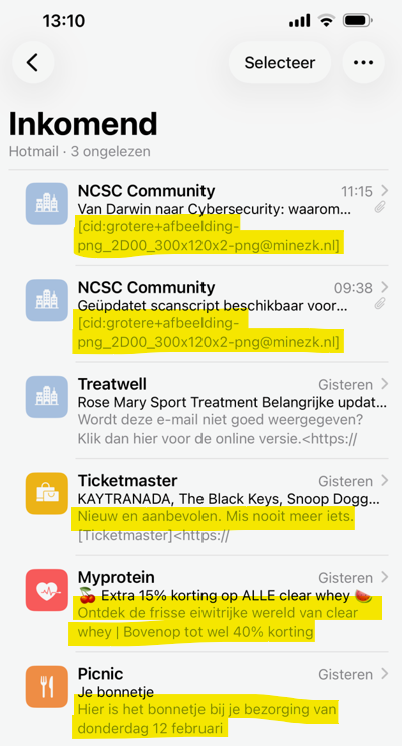
See this example. I would like to - same as the other emails below - add informative information in the preheader.

Now, as you can see in the top two emails, it shows the name of the image file of our community logo.

Where and how can I change the preheader of the email, without changing the place of the logo?
Parents
  • Hi  

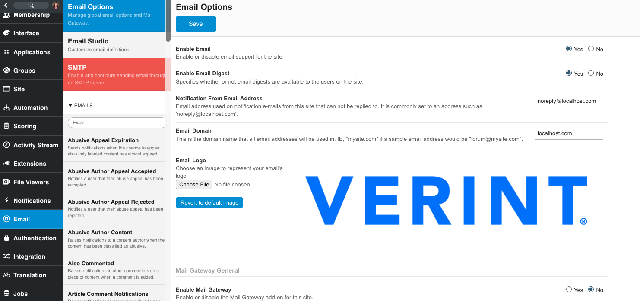
    As I am sure you kow, under Email Options in the admin panel is where you can adjust the logo for emails: 


    I think what you are showing above is actually a logged Verint bug. Maybe you can confirm what Version of 13 you are on? This information below is what I had logged related to the bug you are shwoing in your screenshot above: 

    Plain text bodies of emails are not properly cleaned of HTML Notificaitons on phones from community emails are showing script for styline and not email body 1. Perform an action to generate an email from your community
    2. View that email preview on your
    locked screen of your mobile device - you will see HTML code in the preview
    TE-18971 13.0.2


    This other bug (showing information below) is also realted to showing the symbols in the email: 

    Appearance of encoded symbol(s) in a plain text email format They are showing and should not be 1. Perform an action to generate an email from your community
    2. View that email preview on your
    locked screen of your mobile device - you will see symbols
    TE-19238 13.0.3


    cc:   

Reply
  • Hi  

    As I am sure you kow, under Email Options in the admin panel is where you can adjust the logo for emails: 


    I think what you are showing above is actually a logged Verint bug. Maybe you can confirm what Version of 13 you are on? This information below is what I had logged related to the bug you are shwoing in your screenshot above: 

    Plain text bodies of emails are not properly cleaned of HTML Notificaitons on phones from community emails are showing script for styline and not email body 1. Perform an action to generate an email from your community
    2. View that email preview on your
    locked screen of your mobile device - you will see HTML code in the preview
    TE-18971 13.0.2


    This other bug (showing information below) is also realted to showing the symbols in the email: 

    Appearance of encoded symbol(s) in a plain text email format They are showing and should not be 1. Perform an action to generate an email from your community
    2. View that email preview on your
    locked screen of your mobile device - you will see symbols
    TE-19238 13.0.3


    cc:   

Children
No Data