Total visits per member

How would I obtain the total number of times a member has logged in within a given time period?  Is there a report that tracks this?  We want to see how engaged each client is and when they are the most engaged.  What are we doing to capture this info?  Join Date and Login date are not enough for this data request.

Parents
  • Hi  

    Based on my experience working across multiple Verint Community implementations, I am not aware of an out-of-the-box report or standard functionality that provides a total login count per member within a specified date range.

    The standard user profile data typically includes information such as Join Date and Last Login Date, but these fields do not provide the level of engagement tracking you're looking for, such as the number of logins over time or detailed login frequency analysis by member.

    That said, if this level of engagement reporting is important for the team, we'd be happy to explore it further with you. Based on the specific metrics you're looking to track, we can assess whether a custom reporting solution is feasible and review what data may already be available through the platform, APIs, or other reporting mechanisms. From there, we can determine the best approach to providing the login frequency and engagement insights you're looking for.

  • The closest out-of-the-box solution is available within the Auditing section under Monitoring in the Administration Panel.

    From there, you can filter audit records by both the action type and the member who performed the action. For example, you could filter for the Authenticated action type and then search for a specific username to view related activity.

    By default, the audit log retains approximately two weeks of entries. While a date filter is available, results are generally limited to the retention period of the active audit log. Once entries exceed that retention window, they are moved to the Archive tab within the Auditing area.

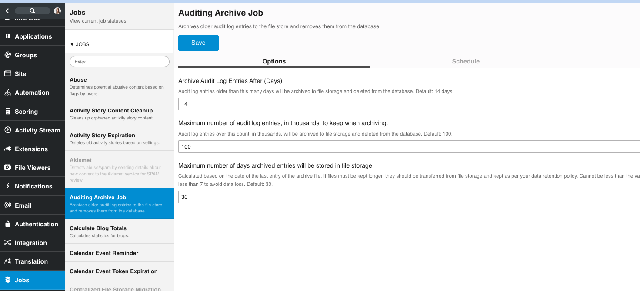
    Archived audit logs are typically configured to be retained for around 60 days, though both retention periods and archival settings are configurable within the Administration Panel. These settings are managed through the Audit Archive Job configuration.

Reply
  • The closest out-of-the-box solution is available within the Auditing section under Monitoring in the Administration Panel.

    From there, you can filter audit records by both the action type and the member who performed the action. For example, you could filter for the Authenticated action type and then search for a specific username to view related activity.

    By default, the audit log retains approximately two weeks of entries. While a date filter is available, results are generally limited to the retention period of the active audit log. Once entries exceed that retention window, they are moved to the Archive tab within the Auditing area.

    Archived audit logs are typically configured to be retained for around 60 days, though both retention periods and archival settings are configurable within the Administration Panel. These settings are managed through the Audit Archive Job configuration.

Children
No Data