What's the intended behaviour for permissions and changing of group type?

Picture this:

You're setting up a new group for your community, you're configuring its widgets, its applications, and you're going to put it "live", and doing so means that you're changing it from:

- Private (Unlisted)

to

- Public (Open Membership)
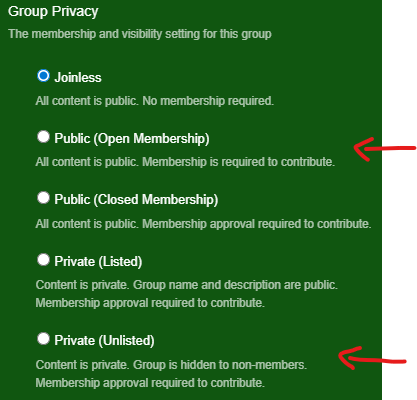
If you're particularly 'on the ball' you've already configured the default template permissions here:
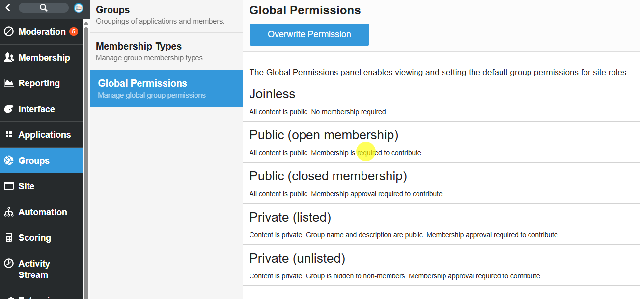
Where for Private (unlisted) you do not have "read group" permissions for registered users, or for everyone/anonymous users (aka the public.

Great! You're ready to go live, you have changed your group to "Public (Open Membership)" and you're good to go.

Except, you're not. Someone is unhappy, and you need to change it back.

No worries, right? You can go to "Private (Unlisted)" and it'll reset the permissions, it'll remove those who have "read group" access, and it will be hidden from the public.

Well Then

For some reason they do not, at least not for me.

The 'everyone' and 'registered users' roles still have read access, nothing has been removed or denied. I'd be okay if 'members' still had it, because we haven't said to remove all members, but it appears it's not applying the global permission template to over-ride a 'permitted' to a 'denied'.

Is anyone else experiencing or seeing this, have I discovered a bug? I believe we're on 12.1.9.35025

Parents
  •  

    It does sound like you may have run into a platform bug. Normally, when you switch a group back from Public (Open Membership) to Private (Unlisted), the permissions should reset according to the default template, and “read group” access for roles like Everyone or Registered Users should be removed unless explicitly granted.

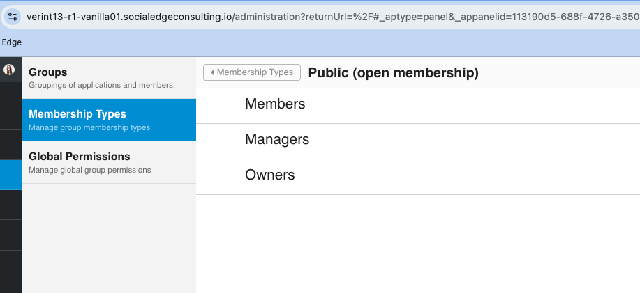
    A follow-up question: are you solely using site roles to permission users, or do you also have those site roles applied as Members, Managers, or Owners? There are separate settings for membership type in the same area of the admin panel, and these can sometimes override or interact with the site role permissions in unexpected ways.

    Since the permissions aren’t updating as expected, I would recommend opening a ticket with Verint Support. They can confirm whether this is a known issue in version 12.1.9.35025 and advise on any workarounds or patches. In the meantime, you may need to manually adjust the permissions for those roles to ensure the group is fully private.

  • A follow-up question: are you solely using site roles to permission users, or do you also have those site roles applied as Members, Managers, or Owners?

    We have a role 'Registered Users' that members are added to when they create an account, and then when they interact with a group, they would become a 'member' of that group too.

    I set permissions appropriately on both in the Membership Types 'definition' for what they should and shouldn't be allowed to do.

    In the meantime, you may need to manually adjust the permissions for those roles to ensure the group is fully private.

    This is what I have had to do.

    An important security issue is that we can no longer trust this functionality to revert or switch permissions, and it has to be double checked each time a change is made.

Reply
  • A follow-up question: are you solely using site roles to permission users, or do you also have those site roles applied as Members, Managers, or Owners?

    We have a role 'Registered Users' that members are added to when they create an account, and then when they interact with a group, they would become a 'member' of that group too.

    I set permissions appropriately on both in the Membership Types 'definition' for what they should and shouldn't be allowed to do.

    In the meantime, you may need to manually adjust the permissions for those roles to ensure the group is fully private.

    This is what I have had to do.

    An important security issue is that we can no longer trust this functionality to revert or switch permissions, and it has to be double checked each time a change is made.

Children
No Data