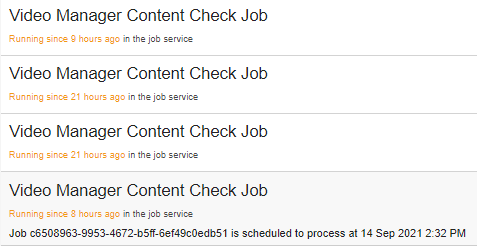
This issue is related to a private support ticket #1160782
Introduction
- We had implemented multiple custom Verint Jobs for a extension called Video Manager, this extension is intended for managing and processing multiple videos on Verint instance
- This extension have two primary job that handles processing videos on server VideoManagerContentCheckJob and VideoManagerJob
- VideoManagerContentCheckJob - is running once a day + once at server restart, it re-checking all content on server for unprocessed video and schedules them for processing
- VideoManagerJob - is running every 1 minute to check is there any video scheduled for processing, if there no video it exits immediately
Server info:
- Verint version 11.1.8.16788
Issue
1. On server launch, as scheduled VideoManagerContentCheckJob perform checking of all videos on server
2. We have very detailed event logging that shows that main method of this job Execute(...) is exiting successfully
3. After job is finished, very frequently, we keep seeing VideoManagerContentCheckJob in a list of active job, that stay there marked as active forever
4. Server restart is not helping to get rid of them, and new fake active items keep appearing
4.1. We can be totally sure that this active Job are "ghosts" because we have detailed log that shows that main job method is exiting and we have a named mutex lock inside every Job runs that will prevent multiple job instance to run in parallel
Screenshot from Job administration panel, all of these Job are actually not active and was finished successfully long time ago