Bookmark for custom page

Former Member
Former Member

Hi Team,

I created a custom page and I don't create a any ContentId & ContentTypeId to this page.

I want a bookmark to this custom page and I given the  below sample for custom page,

public void RegisterUrls(IUrlController controller)

{
      controller.AddPage("page-members-rewards", "members/{UserName}/testpage", null, userNameConstraints, "page-members-rewards");
}

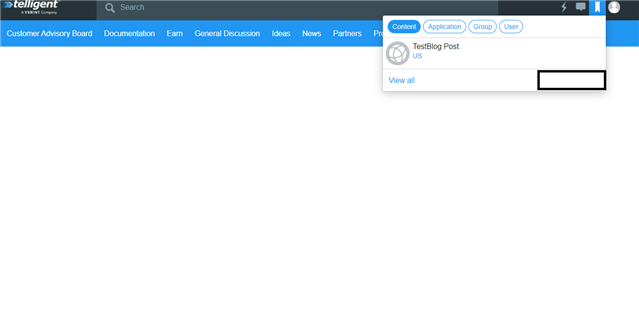
Kindly guide me how to resolve this issue and bookmark button and also disabled here and I underline in blank box.
Regards,

Kiran Cherukuri.

Parents
No Data
Reply
  • Former Member
    0 Former Member in reply to Former Member

    Hi  ,

    I added the IContentType like below in my c# code,

    using System;
    using System.Collections.Generic;
    using System.Text;
    using Telligent.Evolution.Extensibility;
    using Telligent.Evolution.Extensibility.Api.Version1;
    using Telligent.Evolution.Extensibility.Content.Version1;
    using Telligent.Evolution.Extensibility.Version1;
    
    namespace Telligent.Test.Widget.Extension
    {
       public class TestContentType : IContentType, ITranslatablePlugin ,IBookmarkableContentType
        {
            IContentStateChanges _contentState = null;
            ITranslatablePluginController _translations = null;
    
            #region IPlugin Members
            string IPlugin.Name
            {
                get { return "Coupon Redeemption Content Type"; }
            }
            string IPlugin.Description
            {
                get { return "Coupon Redeemption Content Type"; }
            }
    
            void IPlugin.Initialize()
            {
    
            }
            #endregion
    
            #region IContentType Members
            Guid[] IContentType.ApplicationTypes
            {
                get { return new Guid[] { ContentTypes.ApplicationId }; }
            }
    
            void IContentType.AttachChangeEvents(IContentStateChanges stateChanges)
            {
                _contentState = stateChanges;
            }
    
            Guid IContentType.ContentTypeId
            {
                get { return ContentTypes.ContentTypeId; }
            }
    
            string IContentType.ContentTypeName
            {
                get { return _translations.GetLanguageResourceValue("ContentTypeName"); }
            }
    
            IContent IContentType.Get(Guid contentId)
            {
                return (IContent)PointsCouponData.GetCouponDetails(contentId.ToString());
                //return Apis.Get<IContents>().Get(contentId, ContentTypes.ContentTypeId);
            }
            #endregion
    
            #region ITranslatablePlugin Members
            Translation[] ITranslatablePlugin.DefaultTranslations
            {
                get
                {
                    var t = new Translation("en-US");
                    t.Set("ContentTypeName", "Coupon Redeemption ContentType Listings");
                    return new Translation[] { t };
                }
            }
    
            void ITranslatablePlugin.SetController(ITranslatablePluginController controller)
            {
                _translations = controller;
            }
            #endregion
    
            #region IBookmarkableContentType
    
            public bool CanBookmark(Guid contentId, int userId)
            {
                return CanUseBookmarks(contentId, userId);
            }
    
            public bool CanUnBookmark(Guid contentId, int userId)
            {
                return CanUseBookmarks(contentId, userId);
            }
    
            public bool SupportsBookmarks
            {
                get { return true; }
            }
    
            private bool CanUseBookmarks(Guid contentId, int userId)
            {
    
                //var read = new Guid("4F692E0C-9CAB-4d09-9126-684FAF41A085");
                //var permission = Apis.Get<IPermissions>().Get(read, userId, contentId, ContentTypes.ContentTypeId);
                //return permission.IsAllowed;
                return true;
            }
    
            #endregion
        }
    }
    

    I passed the url data in RegisterUrls() like below

    public void RegisterUrls(IUrlController controller)
            {
                controller.AddPage("page-members-custom", "r/test-details/{Giud}/{PageName}", null, null, "page-members-custom", new PageDefinitionOptions()
                {
                    DefaultPageXml = @"<contentFragmentPage pageName=""page-members-custom"" isCustom=""false"" layout=""HeaderTopContentLeftSidebarRight"" themeType="""">
          <regions>
            <region regionName=""RightSidebar"">
                <contentFragments>
                    <contentFragment type=""Telligent.Evolution.ScriptedContentFragments.ScriptedContentFragment, Telligent.Evolution.ScriptedContentFragments::57f01ee86a2c4a5a948833e829a6c709"" showHeader=""True"" cssClassAddition=""full-border with-header"" isLocked=""False"" configuration="""" />
                </contentFragments>
            </region>
            <region regionName=""Content"">
              <contentFragments>
                <contentFragment type=""Telligent.Evolution.ScriptedContentFragments.ScriptedContentFragment, Telligent.Evolution.ScriptedContentFragments::f54116426f5a4c189ce488dfe1b86cb7"" showHeader=""true"" cssClassAddition=""no-wrapper with-spacing responsive-1"" isLocked=""False"" configuration="""" />
             </contentFragments>
            </region>      
          </regions>
          <contentFragmentTabs />
        </contentFragmentPage>",
                    TitleFunction = () => _translations.GetLanguageResourceValue("page-members-custom"),
                    DescriptionFunction = () => _translations.GetLanguageResourceValue("page-members-custom-description"),
                    ParseContext = ParseUserContextByRewards
                });
            }
    		
    		   private void ParseUserContextByRewards(PageContext context)
            {
                var contentId = context.GetTokenValue("Giud");
    
                var item = new ContextItem()
                {
                    TypeName = "Rewards",
                    ApplicationId = new Guid("3858CD53-E3B3-443B-8E22-0C1D8AC711BA"),
                    ApplicationTypeId = ContentTypes.ApplicationId,
                    ContainerId = new Guid("5619DA54-61ED-4E92-AC09-3BDDCAE4A789"),
                    ContainerTypeId = new Guid("23B05A61-C3E5-4451-90D9-BFA00453BCE4"),
                    ContentId = new Guid(contentId.ToString()),
                    ContentTypeId = ContentTypes.ContentTypeId,
                    Id = contentId.ToString()
                };
                if (item != null)
                    context.ContextItems.Put(item);
            }

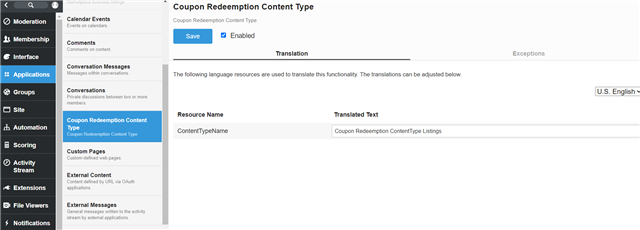
    I was enabled the contenttype like from my content types list.

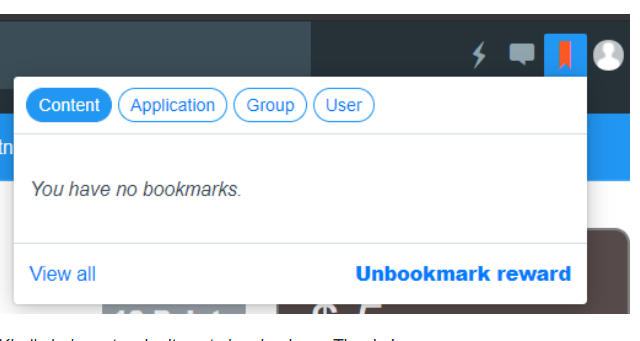
    When I bookmark the page, bookmark happens and bookmark color changed to red color but It is not displayed in the bookmark list anywhere 

    You can check the above code references. Kindly check help me what is mistake done by me. Thanks!


Children
No Data