How are custom assembly versions determined for the admin UI?

Looking in the new custom assemblies panel the version number does not fully reflect the details from the underlying dll

so it is not possible to confirm which exact version has been deployed, esp on a saas environment 

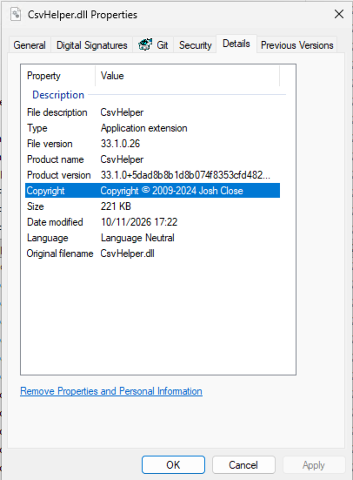
for example CsvHelper shows as 33.0.0.0 but has more specific details in the dll 



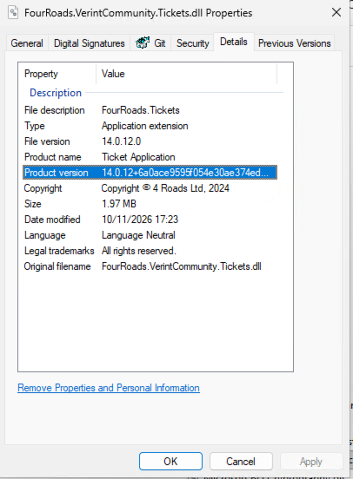
This is also the case if we look at some of our own custom dlls such as the ticketing app which simply shows as 14.0.0.0 rather than the specific build 



Is it possible to alter the information shown ? 


Parents
  • The custom assemblies panel currently displays the .net assembly version, which is often fixed and doesn't change between builds.

    Is it possible to alter the information shown ? 

    re: your question

    Yes, for your own custom plugins, you can set the assembly version per build in the csproj file (e.g. <AssemblyVersion>14.0.12.0</AssemblyVersion>), and after you rebuild and redeploy, the panel will show the exact build. Please test this first, as changing the assembly version can break binding if other assemblies reference that plugin. For 3rd party libraries, the assembly version is fixed by the vendor, so it can't be changed on your side.

Reply
  • The custom assemblies panel currently displays the .net assembly version, which is often fixed and doesn't change between builds.

    Is it possible to alter the information shown ? 

    re: your question

    Yes, for your own custom plugins, you can set the assembly version per build in the csproj file (e.g. <AssemblyVersion>14.0.12.0</AssemblyVersion>), and after you rebuild and redeploy, the panel will show the exact build. Please test this first, as changing the assembly version can break binding if other assemblies reference that plugin. For 3rd party libraries, the assembly version is fixed by the vendor, so it can't be changed on your side.

Children