


I was reviewing the updated Email Options area and wanted to say that the UI changes look great. The layout feels much cleaner and more intuitive than previous versions, and it seems like it will be significantly easier for administrators to navigate and manage email-related settings.
While exploring the new experience, I did run into one item that I wasn't sure about. I noticed that the Incoming Mailbox Accounts option can be enabled, but after enabling it I don't see any additional configuration settings, setup wizard, or fields for defining mailbox connection details. I expected there to be some follow-up configuration available once the feature was turned on.
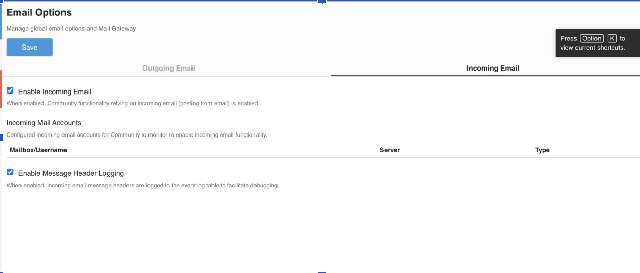
Is this the intended behavior, perhaps because there is another prerequisite or configuration location that I'm overlooking? Or is this a known issue with the current release? I just wanted to make sure I'm not missing a step before I spend more time troubleshooting on my side.
