Is there a built-in Restricted Access page in 14 that does not require the Restricted Access Plugin that Professional Services has in the Marketplace?
It's a function of the "Review Mode" configuration. How do I configure environment options?
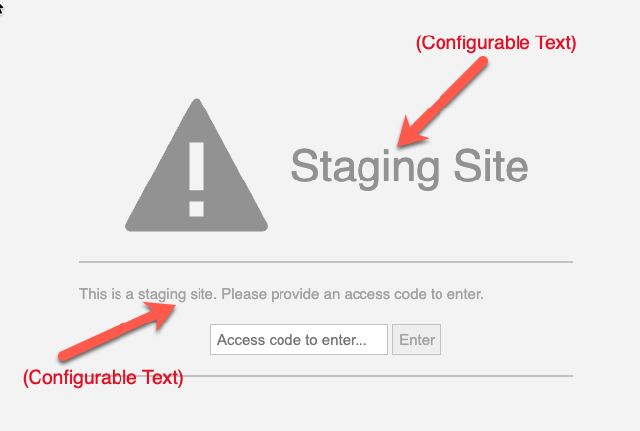
Here is an example of what a Review Mode UI looks like. In this scenaroio, it is to restrict access to a Staging Site.

Michael Monteleone Many customers want this page branded. Is this possible?
Not currently, beyond configurable labeling. It's in a similar class of system-level responses such as the maintenance page automatically shown during upgrading or error pages.
Yes, but customers will not want this. They always want some kind of branded maintenance page. I think we would need to rethink the previous Access Code page though as the static html file approach won't work any more.
The old plugin used unsupported APIs, sometimes caused issues, and there isn't a clear upgrade path for it. I'd recommend we use a built-in approach. That said, what level of customization would a customer want? Would being able to supply colors and a logo in addition to labeling be enough? Worth noting that, like the old maintenance page, this new built-in preview-mode middleware necessarily runs outside of the typical theming/widget/styling/API context.
I think at a minimum they'd like to set the background colour and add their logo, so it at least carries their brand. The text side of it already seems to be covered. A plain grey page with a big exclamation isn't very inviting and can be quite jarring. Here is an example of one customer's site although they don't have the logo.
Fully agree, they all want to use the page and implement their own branding and wording.
This is being tracked internally as TE-19673 to expand the configurability of both the preview mode page (and ideally the maintenance mode page as well which is automatically shown during upgrades with a progress bar, and is a new part of 14's deployment model). The customization would continue to support the current configurability of HTML labels and messaging, adding colors, and potentially a custom logo depending on how possible a logo is to support in a pre-ready site and infrastructure state.
Regarding logos, we tend to embed the base64 version in the page given we often can't serve it via the app so it ensures it's available.
Good to hear - that was one option on the table. If you're comfortable with that, it may be the way to go.