I have a custom ISearchableContentType
I'm wondering once I create new content of that type, how long will it take before it shows up in the search index?
I have a custom ISearchableContentType
I'm wondering once I create new content of that type, how long will it take before it shows up in the search index?

public IList<SearchIndexDocument> GetContentToIndex()
        {
            List<SearchIndexDocument> documents = new List<SearchIndexDocument>();
            var pages = Components.CMSPages.ListPages();
            foreach (var page in pages)
            {
                if (page.IsPublished)
                {
                    SearchIndexDocument doc = new SearchIndexDocument(page.ContentId, Components.CMSPages.CMS_PAGE_CONTENT_TYPE_ID)
                    {
                        Content = page.ContentBlob,
                        Title = page.MetaTitle,
                        TypeName = "WebContent",
                        Url = page.Url
                    };

                    documents.Add(doc);
                }
            }

            return documents;
        }

        public string GetViewHtml(IContent content, Target target)
        {
            var page = Components.CMSPages.Get(content.ContentId);
            return page.MetaDescription;
        }

        public int[] GetViewSecurityRoles(Guid contentId)
        {
            List<int> roleIds = new List<int>();
            // Add the Everyone Role
            roleIds.Add(1);

            return roleIds.ToArray();
        }
While I review can you try manually adding a role via the document.IndexFields. The values will be "roles", "1".
In GetContentToIndex(), build your new document using ISearchIndexing.NewDocument(..). That in turn will call ISearchableContentType.GetViewSecurityRoles() 
Looks like I have the roles now appearing in the solr document
<doc>
    <str name="id">28c4b8f2-6f3a-4b95-aff4-df875968afd3</str>
    <str name="contenttypeid">2da07dc7-f5f3-4f6f-8766-218a0153714e</str>
    <str name="type">WebContent</str>
    <str name="url">/ronnie-coleman</str>
    <str name="title">Ronnie Coleman Is a Boss</str>
    <str name="content">Ronnie Coleman Is a Boss</str>
    <str name="rawcontent">Ronnie Coleman Is a Boss</str>
    <arr name="roles">
      <str>1</str>
    </arr>
    <double name="contentscore">0.0</double>
    <arr name="category">
      <str>WebContent</str>
    </arr>
    <long name="_version_">1660326031514402817</long>
    <bool name="isapplication">false</bool>
    <bool name="iscontainer">false</bool>
    <date name="timestamp">2020-03-05T12:11:33.116Z</date>
    <float name="score">37.67538</float></doc>
, but still not showing up in site search. Does the number correlate to the Int Id in the cs_Security_Roles table?
Yes, its correlates to that Id. Site searches also issues collapsed/grouped results which could be filtering out these results. To avoid this possibility will you add a field called "collapse" to the IndexFields list and set the value to typename and unique contentid. So, an example field value would be "WebContent:28c4b8f2-6f3a-4b95-aff4-df875968afd3".
Here is the Solr Doc I have being indexed now. Still not showing up from the top search bar though.
<result name="response" numFound="1" start="0" maxScore="113.34428">
  <doc>
    <str name="collapse">WebContent:de5dfe62-f627-4fb4-a59e-ba937b7c8171</str>
    <arr name="roles">
      <str>1</str>
    </arr>
    <str name="title">Jay Cutler</str>
    <str name="content">Jay Cutler</str>
    <str name="rawcontent">Jay Cutler</str>
    <str name="id">de5dfe62-f627-4fb4-a59e-ba937b7c8171</str>
    <str name="type">WebContent</str>
    <str name="url">/jay-cutler</str>
    <str name="contenttypeid">2da07dc7-f5f3-4f6f-8766-218a0153714e</str>
    <double name="contentscore">0.0</double>
    <arr name="category">
      <str>WebContent</str>
    </arr>
    <long name="_version_">1660340289554874369</long>
    <bool name="isapplication">false</bool>
    <bool name="iscontainer">false</bool>
    <date name="timestamp">2020-03-05T15:58:10.639Z</date>
    <float name="score">113.34428</float></doc>
</result>
</response>
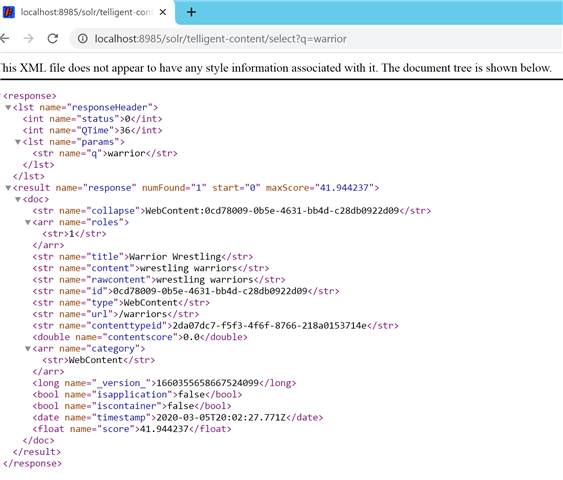
Ok...interesting...the results show up if I am anonymous, so it appears I might need to add more roles?
I got it working... Had to add all roles as separate index fields. Seems like the GetViewSecurityRoles(Guid contentId) call never executed to add role ids to the search document.
        public IList<SearchIndexDocument> GetContentToIndex()
        {
            List<SearchIndexDocument> documents = new List<SearchIndexDocument>();
            var pages = Components.CMSPages.ListPages();
            foreach (var page in pages)
            {
                if (page.IsPublished)
                {
                    List<IndexField> fields = new List<IndexField>();
                    fields.Add(new IndexField("collapse",String.Format("{0}:{1}","WebContent",page.ContentId)));
                    fields.Add(new IndexField("roles", "1"));
                    fields.Add(new IndexField("roles", "3"));
                    fields.Add(new IndexField("roles", "4"));

                    var doc = Apis.Get<ISearchIndexing>().NewDocument(page.ContentId, Components.CMSPages.CMS_PAGE_CONTENT_TYPE_ID, "WebContent", page.Url, page.MetaTitle, page.ContentBlob);
                    doc.Id = page.ContentId.ToString();
                    doc.ContentTypeId = Components.CMSPages.CMS_PAGE_CONTENT_TYPE_ID;
                    doc.IndexFields = fields;
                    doc.Title = page.MetaTitle;
                    doc.Content = page.ContentBlob;
                    doc.Id = page.ContentId.ToString();
                    doc.TypeName = "WebContent";
                    doc.Url = page.Url;
                    doc.ContentTypeId = Components.CMSPages.CMS_PAGE_CONTENT_TYPE_ID;
                    documents.Add(doc);
                }
            }

            return documents;
        }

        public string GetViewHtml(IContent content, Target target)
        {
            var page = Components.CMSPages.Get(content.ContentId);
            return page.MetaDescription;
        }

        public int[] GetViewSecurityRoles(Guid contentId)
        {
            List<int> roleIds = new List<int>();
            // Add the Everyone Role
            roleIds.Add(1);
            roleIds.Add(3);
            roleIds.Add(4);
            roleIds.Add(2);

            return roleIds.ToArray();
        }
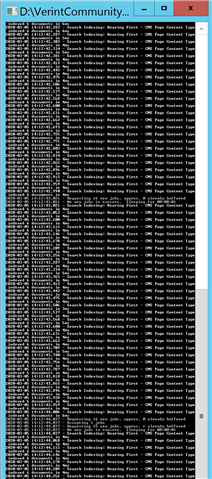
now that the documents are working, I noticed that the job scheduler is pretty much indexing this content non-stop...is there something I need to fix here?? I ran the job service as an admin to watch the output and it is a non-stop scroll of what you see below.